As a specialized Webflow agency based in Amsterdam, staying on top of platform updates is not just part of our job. It is how we ensure your digital presence remains a high-performance asset rather than a liability. At Groove Digital, we manage complex digital experiences for B2B and SaaS brands that require precision, security, and speed. We know that in a fast-moving market, technical debt is the silent killer of growth. That is why we are closely managing the transition as Webflow moves away from its legacy infrastructure.
Webflow is currently implementing its most significant structural change in a decade by sunsetting the legacy Editor. This interface has been the standard for content updates for years, but it is reaching its technical limits. On August 4, 2026, the legacy Editor will be retired permanently. In its place, Webflow has introduced Client Seats. This is a more robust, role-based system designed to give marketing teams more power while maintaining the strict design guardrails that keep a site professional. This article explains what this shift means for our clients, how the new system differs from the old one, and how Groove Digital is leading this transition for you.
What this means for our clients
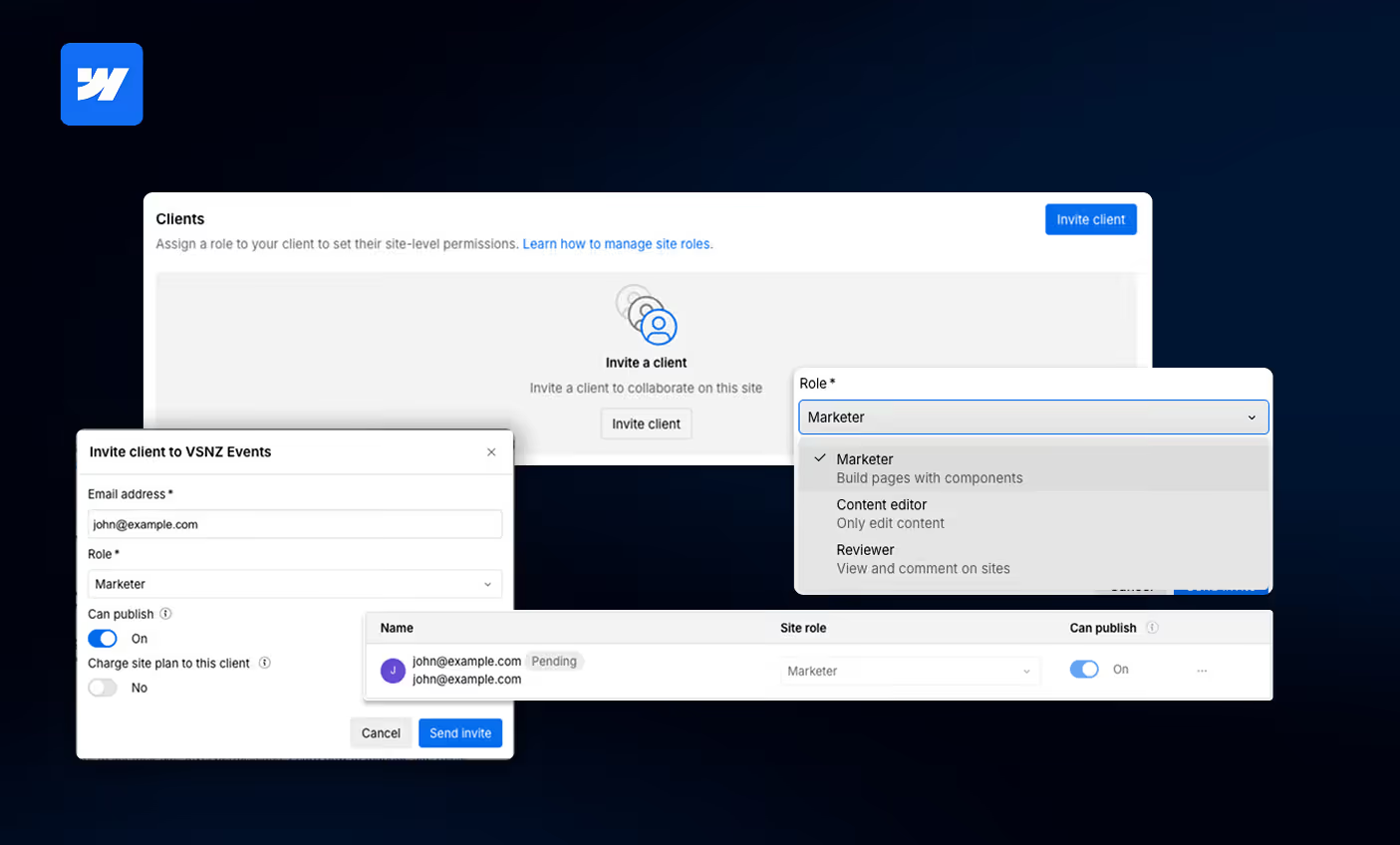
The shift to Client Seats marks the end of the one-size-fits-all approach to website management. Previously, every person invited to edit a site had the same basic permissions. Now, we can tailor access to fit the specific roles within your team. This ensures that everyone has exactly the tools they need to be effective without being overwhelmed by technical settings they do not use.
Key benefits and roles of this new structure include:
- The Content Editor Role: Specifically designed for team members who need to update text, swap images, and manage blog posts or case studies in the CMS. This role provides a stable, simplified environment for routine content updates without the risk of touching the site's layout.
- The Marketer Role: A significant expansion of autonomy that allows your team to actually build new pages. Using pre-designed components and templates we have already established for your brand, your marketing team can launch campaign landing pages in hours rather than days.
- The Reviewer Role: This is a free seat that allows stakeholders to browse the site and leave comments directly on specific elements. It streamlines the feedback process significantly, as it removes the need for external screenshot tools or confusing email chains.
- Direct Asset Control: For the first time, clients gain access to the Assets panel. This means you can manage your own media library, organize files into folders, and update SEO Alt-text independently, which speeds up your internal marketing workflows.
- Safe Collaboration: Clear guardrails ensure that your team can work with speed and confidence. Because we build with a component-based system, your team can add or reorder sections while the core design and mobile responsiveness remain protected.
How the new system differs from the old one
The legacy Editor was essentially a simplified interface that lived as an overlay on top of your live website. While it was intuitive, it created several technical hurdles. Because it rendered over the live site, it often conflicted with custom code, complex animations, and modern scripts. It also lacked support for Webflow’s newest and most powerful features. This caused a disconnect where the editing experience did not always match the high-performance reality of the published site.
The new Edit mode is integrated directly into the core Webflow platform. This architectural shift solves several long-standing pain points. For the first time, editors have access to the Assets panel. This allows you to manage your own media library, organize files into folders, and update SEO Alt-text directly. Furthermore, the new system is fully compatible with Webflow Localization. This means you can switch between different language versions of your site and manage translations without leaving the canvas. Unlike the legacy system, Client Seats also support real-time collaboration, so you can see exactly who else is working on a page and avoid the frustration of overwriting someone else's work.
What changes for Webflow Agencies like Groove Digital
For Webflow agencies, this update changes the fundamental workflow of how we build and hand over projects. One of the most significant benefits is the ability to collaborate earlier in the process. With the legacy system, we could only grant editor access after a site was hosted on a paid plan. With Client Seats, we can invite you into the project during the Build Sprint. This allows your team to start populating the CMS with actual content while we are still finalizing the development, which drastically reduces the time to launch.
However, the way seats are allocated has also changed. Webflow is moving away from tying editor seats to the site hosting plan and is instead tying them to our Agency Workspace. Under our current plan, we provide up to three free Client Seats per project. This ensures your key team members have access without adding extra costs to your monthly billing. We also have to account for the sunsetting of whitelabeling features. Webflow is moving toward a model where every collaborator has their own verified account. While this removes some branding customization in the backend, it provides a much higher level of security and a clear audit trail of all site changes.
How Groove Digital helps you transition
We understand that technical migrations can feel overwhelming, which is why we handle the heavy lifting for you. Our "Sprints & Recipes" methodology is built around clarity and speed. We don't just flip a switch; we strategically map your team’s needs to the new role hierarchy. We ensure that your "Marketers" have the right components to build pages safely and that your "Content Editors" are trained on the new Asset Manager.
As your partner, we take care of the following:
- Migration Management: Webflow will automatically migrate legacy users on May 4, 2026, but we are moving our clients earlier to ensure there are no surprises and that you can start using the new features today.
- Setting the Guardrails: We build your site using a component-based design system. This means we pre-approve the sections you can use, ensuring that every new page your team builds is automatically mobile-responsive and SEO-optimized.
- Security & Compliance: We manage the transition to individual verified accounts, which is essential for GDPR compliance and overall digital governance for our clients in the Netherlands and beyond.
- Ongoing Support: Every project we launch includes 30 days of post-launch support at no extra cost, giving your team plenty of time to get comfortable with the new interface.
Your website is more than just a digital brochure. It is a revenue engine that needs to stay future-ready. By moving away from the legacy Editor, we are giving your team the professional tools required to manage a modern, scalable brand. We will be sending out invitations and adding your access shortly. If you have any questions about how these roles fit your specific team structure, or if you need to add more collaborators, please reach out to us at support@groovedigital.agency.




.avif)